Answering a call
A parent sees an incoming call, answers, ends it, and checks missed calls in Recent calls.
Demo data: names, IDs and call times are illustrative. Captions are burned into the picture.
Shivnex by Skandev, engineered by Oorulogix.
Skandev Solutions · Bengaluru
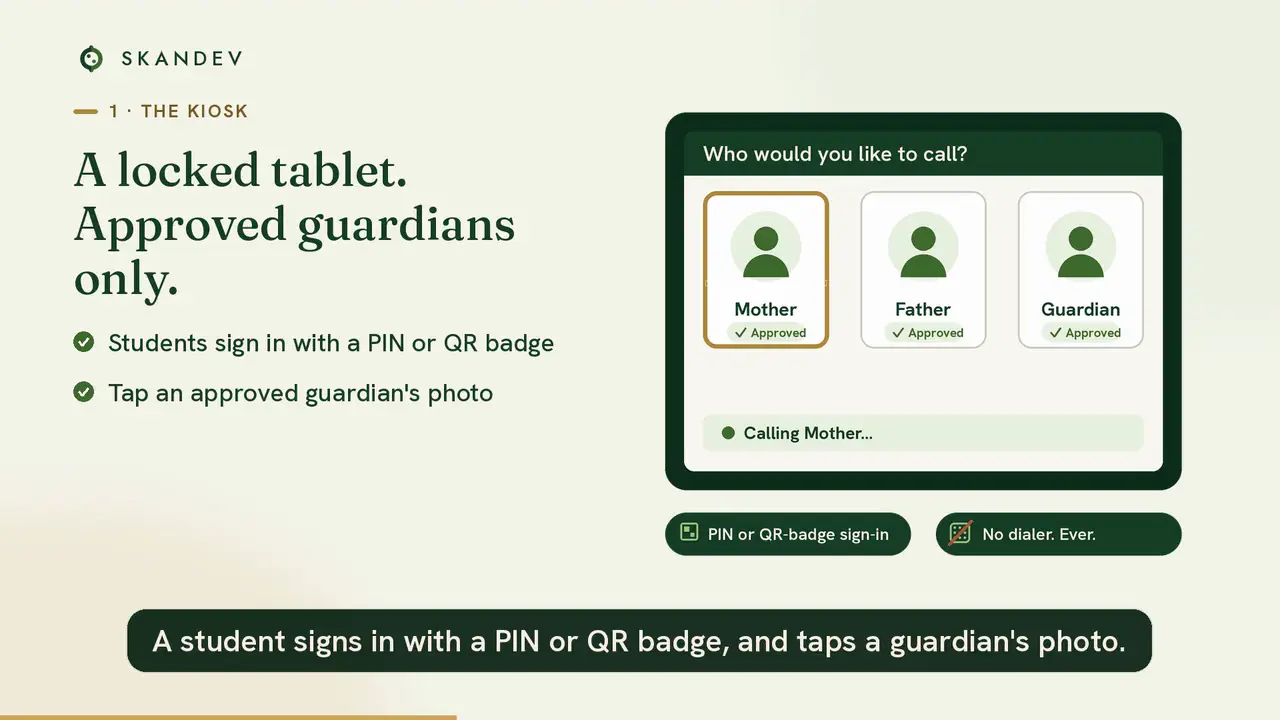
Shivnex is a locked hostel tablet kiosk that lets a student call only an approved parent: no browser, no app store, no stranger dial.
Shivnex by Skandev, engineered by Oorulogix.
Contact us for pricingThe hostel tablet runs Shivnex and nothing else. No browser, no app store, no stranger dial.
An approved guardian, the calling window and the limits are checked on the server before a call connects.
Three surfaces: a student kiosk, a parent app and a school console. Each school’s data stays isolated.
A short film for schools: phones stay out of the hostel, a student signs in with a PIN or QR badge on a locked tablet, only an approved guardian can be called, there is no open dialer, parents use a free app, and the school works from a console.
Shivnex by Skandev, engineered by Oorulogix.
English voiceover, with captions burned into the picture. Press play when you are ready. It stays paused, and it never starts with sound on its own.
These are phone recordings. Pick a language — only the clip you choose is loaded. Nothing here plays until you press play, and nothing plays out loud on its own.
A parent sees an incoming call, answers, ends it, and checks missed calls in Recent calls.
Demo data: names, IDs and call times are illustrative. Captions are burned into the picture.
Shivnex by Skandev, engineered by Oorulogix.
How a parent gets into Shivnex Parent: install, choose a language, sign in with a Parent ID, set a password, allow notifications, and use the email-code fallback.
Demo IDs only. Captions are burned into the picture. The same clip sits on the download page for families installing the app.
Shivnex by Skandev, engineered by Oorulogix.
A student taps their photo, enters a PIN or shows a QR badge.
The server checks the guardian, the calling window and the limits.
Like any video call, on the free Shivnex Parent app.
A wall-mounted tablet in the warden’s view. A student taps their photo or types their Student ID, enters a PIN — or shows a QR badge — and chooses an approved parent.
Mum or dad get the free Shivnex app and sign in once with a one-time code. When their child calls, the phone rings like any video call.
Admins import the roster, approve guardians, set calling hours and limits, print QR badges and pair tablets — and see every call.
A teacher is present for every call. Calling is one-way — a child reaches an approved guardian, never the reverse.
One app, Device-Owner locked. Screen-capture blocked, settings behind a staff code.
English, Hindi, Tamil, Telugu and Kannada — the child and the parent each pick their own, in one tap.
Every student gets a private 4-digit PIN and a QR badge. No phones, no passwords, no accounts to manage.
Set calling windows and weekly minute caps per student. The server opens and closes calls when the school decides.
Parents install the free app and sign in with a one-time code. Their phone rings when their child calls.
Adaptive video that holds up on weak rural data — and falls back to crisp audio automatically when it must.
Multi-tenant from day one. Run one hostel or many — each school’s data fully isolated.
Safety
A teacher is present. The call starts from the kiosk, not from a stranger’s phone. Every minute is accountable to the school.
Talk to us about safetyParents can’t dial in or reach a child directly. Only the student starts a call, and only to an approved guardian.
Every guardian is added by the school. No open directory, no strangers.
Calls happen on a supervised tablet in staff view — never a private device in the hostel.
Who called whom, when and for how long — logged for the school.
Data minimised, tenant-isolated per school, with a right-to-erasure flow.
Calls are for connection. Recording stays off unless a school explicitly needs it.
Bengaluru
To shape a future where technology works seamlessly for people — enabling progress, strengthening relationships, and improving everyday life at scale.
Shivnex is the first product — supervised video calls home for boarding students, from a locked hostel tablet, with a teacher present for every call. Shivnex by Skandev, engineered by Oorulogix.
Coming soon
The signal that talks to you.
By Oorulogix, with Skandev.
Dhaari is a traffic-AI concept in development. Not yet deployed.
Pricing
Tablets, data, apps and support are included. We prepare a quote for your hostels and roster. The parent app does not ask families for a card, UPI ID or bank details.
No. Calling is one-way by design — only the student can start a call, and only to guardians the school has approved. Parents cannot dial the kiosk or reach a child directly. Every call happens on a supervised tablet with a teacher present.
Each student gets a private 4-digit PIN (or a QR badge they simply show to the tablet camera). They tap their photo or type their Student ID, enter the PIN, and pick who to call. No phones, no accounts to manage.
Just the free Shivnex Parent app — live on Google Play for Android and on the Apple App Store for iPhone and iPad. They sign in once with a one-time code sent to the email or phone number the school registered, so there is no password to remember. When their child calls, the phone rings like a normal call. Parents are never charged, and never charged per minute.
English, Hindi, Tamil, Telugu and Kannada across both the kiosk and the parent app — a child or parent picks their language in one tap.
Yes. One app, Device-Owner locked: no browser, no app store, no stranger dial. The screen is protected from capture, and staff unlock settings with a private code.
Contact us for pricing. Tablets, data, apps and support are included in the quote we prepare for your hostels and roster. Families are not billed inside the parent app.
Built for India’s DPDP rules from the ground up: data is tenant-isolated per school, calls are minimised and not recorded by default, guardians are consent-based, and there is a full audit trail with a right-to-erasure flow.
Import your roster from a spreadsheet and PINs, QR badges and guardian links are generated in one step. Pair a tablet by scanning a code. A hostel can be calling home the same day.
Tell us about your school. We’ll set up a live demo — kiosk, parent app and console — and talk through pricing for your roster.